Get Quote
Home > News > Fan Knowledge Sharing > DC Axial Fan Maintenance Tips
DC Axial Fan Maintenance Tips

DC Axial Fan Maintenance Tips

SEPTEMBER 16, 2026

Table of Contents

  1. Introduction

  2. Why Small Fans Need Maintenance at All

  3. A Realistic Maintenance Schedule

  4. Cleaning: The Right Way to Do It

  5. Bearing Care and Lubrication

  6. Electrical Checks: Connectors, Cables, and Terminals

  7. What Maintenance Actually Costs

  8. Keeping a Maintenance Log

  9. Summary

  10. Frequently Asked Questions

  11. References

1.Introduction

Small DC axial fans are the workhorses of electronics cooling. They run 24/7 inside power supplies, servers, LED drivers, and industrial control panels, usually with no attention at all, until the day they start humming, whining, or quietly moving no air. By then the electronics they protect have already been running hot for weeks [1].

The good news: a DC axial fan is one of the cheapest pieces of equipment you can maintain. Ten minutes of scheduled care every few months, done with parts you already own, can double its useful life. This guide lays out a practical maintenance plan, the right cleaning techniques, bearing care that actually works, and the electrical checks that catch failures before they take the electronics with them. It is written for facilities technicians, panel builders, and anyone who maintains equipment that relies on small fans.

2.Why Small Fans Need Maintenance at All

DC Axial Fan Maintenance Tips

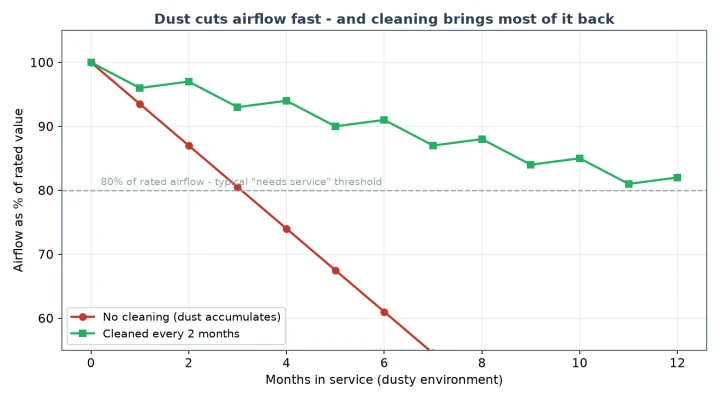
Figure 1: Airflow loss in a dusty environment. Without cleaning, a DC axial fan can fall below 80% of rated airflow within a few months; periodic cleaning keeps it near rated output.

Fans wear out in two ways: mechanically and aerodynamically. Mechanical wear comes from bearings grinding down over tens of thousands of hours. Aerodynamic wear is faster and more insidious - dust builds up on the blades, the airflow drops, and the fan keeps running at the same speed, looking perfectly fine while the equipment above it overheats [4].

Field data from ebm-papst shows dust and dirt as one of the top causes of fan returns, right behind bearing failure [1]. In a dusty or smoky environment, airflow can fall below 80 percent of rated output in a few months. The fan is not broken; it is just dirty. That is why AMCA-rated airflow figures are measured on clean units - and why ASHRAE guidance for equipment rooms always starts with keeping the air path clean before blaming the fan [4] [5].

There is an efficiency angle too. A dust-loaded impeller moves less air at the same motor power, so the equipment needs more cooling power overall. Energy Star guidance for electronics cooling recommends checking airflow paths as part of routine energy maintenance, because a clogged fan quietly inflates cooling energy use while doing less useful work [8].

3. A Realistic Maintenance Schedule

DC Axial Fan Maintenance Tips

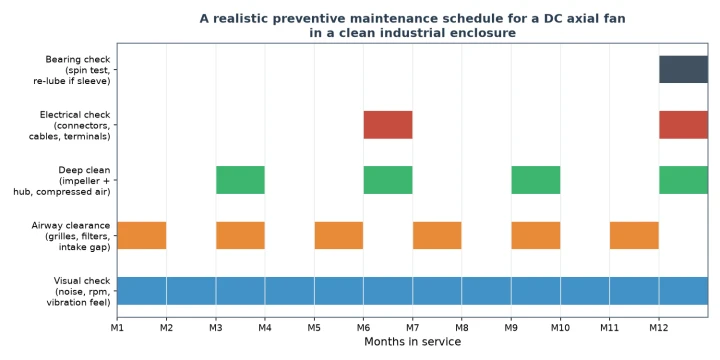
Figure 2: A 12-month preventive maintenance schedule for a DC axial fan in a clean industrial enclosure. Frequency scales up as the environment gets dustier.

A maintenance schedule only works if it fits real life. The one in Figure 2 assumes a fairly clean industrial enclosure: monthly visual checks, bimonthly airway clearance, a deep clean every quarter, electrical checks every six months, and a yearly bearing assessment. In a dusty plant, halve every interval [5].

Monthly (5 minutes):

Look and listen - any new noise, slower spin, or vibration
Feel the airflow at the exhaust with your hand
Check that nothing has blocked the intake or grille
Quarterly (15 minutes):
Blow out dust from blades, hub, and enclosure vents
Inspect the cable for pinching, fraying, or melted spots
Tighten loose mounting screws - vibration loosens them

Yearly (30 minutes):

Do the bearing spin test (covered in Section 5)
Verify voltage and current at the fan connector
Measure or feel airflow and compare with the spec [4]
The exact intervals matter less than the habit. A fan you check monthly will tell you it is failing weeks before it dies; a fan nobody looks at fails silently on the hottest day of the year. Schedule these checks with the rest of your equipment rounds, not as an afterthought [5].

4. Cleaning: The Right Way to Do It

DC Axial Fan Maintenance Tips

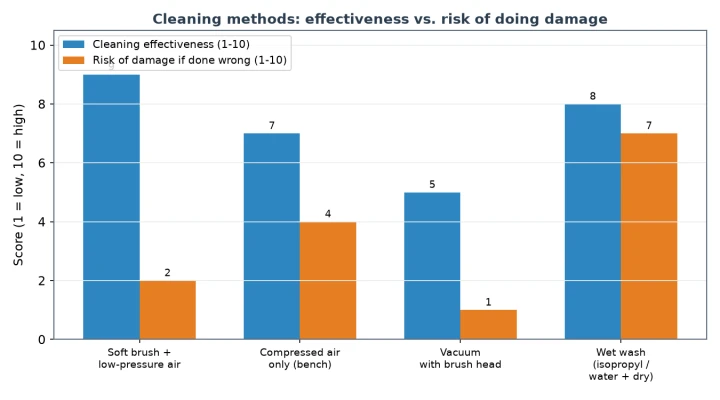
Figure 3: Cleaning method trade-offs. A soft brush plus low-pressure air gives the best cleaning with the least risk; wet washing cleans well but risks bearing damage if you get it wrong.

Cleaning a fan is simple, and doing it wrong is just as simple. The classic mistake is blasting the fan with compressed air while it is still powered: the impeller free-spins at terrifying speed, which is exactly the condition that wears out the bearings. Always disconnect power and lock the impeller before cleaning [7].

The safe sequence:

Disconnect power and let the fan stop completely
Remove dust from blades with a dry soft brush, working outward from the hub
Follow with low-pressure air from the intake side
Clean the grille and enclosure vents with the same brush
For sticky grease-dust, use a cotton swab with isopropyl alcohol, then dry fully
When is wet cleaning worth it? Only for heavily fouled fans in food or process environments, and only when the manufacturer allows it. Water or solvent inside the bearing will wash out the lubricant, so after any wet wash the fan must be dried thoroughly and re-lubricated if it is a serviceable sleeve-bearing unit. This is why the brush-and-air method stays the default: it gets 90 percent of the benefit with almost none of the risk [1].

Cleaning is also the right time to catch small problems before they grow: a chipped blade, a cracked housing, a connector with a hairline crack. Ten seconds of looking while you clean saves a mid-shift fan failure later.

5. Bearing Care and Lubrication

DC Axial Fan Maintenance Tips

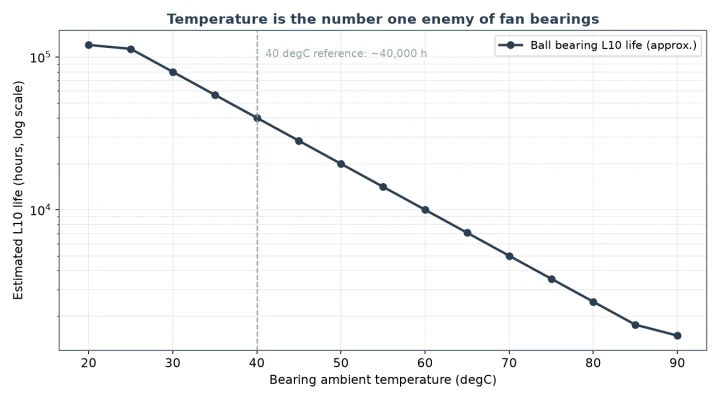
Figure 4: Bearing L10 life versus operating temperature. Every 10 degrees Celsius above 40 degrees roughly halves expected life, which is why cleaning and airflow matter for bearing health.

Bearings decide how long a DC axial fan lives, and temperature decides how long the bearings live. The estimate in Figure 4 is deliberately simple: starting from roughly 40,000 hours at 40 degrees Celsius, every additional 10 degrees halves that figure. Run a fan at 70 degrees and its bearings are good for a year or two, not a decade [2] [7].

The yearly bearing spin test:

Disconnect the fan, flick the impeller with your finger, and let it run down. A healthy fan spins freely for two or more full turns with a smooth, quiet rotation. A worn bearing stops abruptly, feels gritty, or grinds. Sleeve bearings at the squealing stage can sometimes be revived with a drop of light machine oil - a stopgap, not a repair - while ball bearings that grind are past saving and belong in the bin [7].

If you do oil a sleeve-bearing fan, use a single drop of fan-appropriate light oil at the shaft/hub interface, spin the impeller to work it in, and wipe away the excess. Over-oiling attracts dust and does more harm than good. Fans with sealed bearings - most modern units - simply replace the fan when the bearing goes; there is no acceptable way to service a sealed cartridge in the field without damaging it [2].

The maintenance angle on bearings is mostly indirect: keep the fan cool and clean, keep the mounting solid, and don't spin it with compressed air. All the bearing life figures published by Sanyo Denki and Sunon assume those basic conditions, and every one of them is something you control [2] [7].

6. Electrical Checks: Connectors, Cables, and Terminals

Fan maintenance is not all dust and oil. Electrical connections age too, and on a fan they matter more than the motor itself, because a corroded connector can kill the board it feeds, not just the fan. IEEE diagnostic practice for rotating machinery applies at this scale too: check the supply and the connections before you conclude the device itself has failed [3].

What to check every six months:

Connector pins - no corrosion, no blackening, no loose fit. Replace a doubtful connector instead of crimping it again
Cable condition - no pinches, abrasions, or stiff spots showing heat damage
Terminal voltage - measure at the fan pins while running; it should sit within 10 percent of rated voltage
Current draw - compare with the label; a fan drawing noticeably more current is a fan announcing bearing trouble [3]

The voltage and current check is the single highest-value measurement on the list, and it takes thirty seconds with a multimeter. If the voltage collapses under load, the problem is upstream - supply, wiring, or connector - and no amount of fan maintenance will fix it. If the fan draws more current than the label says while airflow is down, you have found the failure mode: dirty impeller or failing bearing, both of which you already know how to handle [1] [3].

7. What Maintenance Actually Costs

DC Axial Fan Maintenance Tips

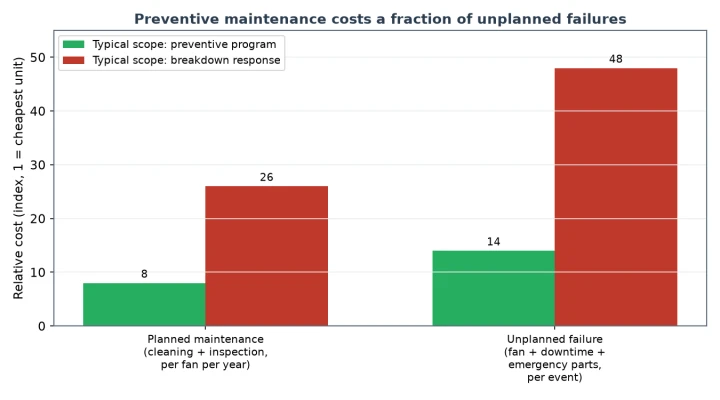
Figure 5: Preventive maintenance costs a small fraction of a single unplanned fan failure when you count the downtime, the emergency parts, and the labor.

Here is the honest math behind every maintenance program. A planned maintenance round on a fan - clean, inspect, measure - costs a few minutes of labor and almost no parts, maybe a few dollars if you need a contact cleaner. An unplanned failure costs the fan, the emergency shipping, the technician's travel time, and the production or network downtime while the equipment runs hot. Even conservative estimates put unplanned events several times higher than planned care, and the DOE's motor system guidance makes the same point: reactive maintenance is the most expensive strategy, predictive and preventive maintenance the cheapest [6].

The ratios shift depending on your environment. A single fan in a benign office enclosure hardly needs a program; plan reactive replacement and move on. But once you have racks of fans in a dusty plant or telecom shelter, the failure mode changes from "cheap part" to "cascade of hot gear," and that is when a scheduled round earns its keep. Match the program to the risk, and keep the log - which brings us to the last habit worth building [6].

8. Keeping a Maintenance Log

Nobody wants paperwork, but a fan maintenance log is not busywork - it is the cheapest diagnostic tool you own. Three columns tell the whole story: date, what you saw, what you did. A line like "10-Sep: bearing squeals after warm-up; ordered replacement fan" converts a memory into a fact you can plan around [6].

The log helps in three ways. First, it reveals trends: a fan that needs cleaning more often than its neighbors is telling you something about the environment. Second, it justifies the program to whoever pays for it, with numbers instead of opinions. Third, when a fan in a critical rack fails, the log tells you how old it is and what it has been through, so you can decide instantly whether to swap a part or the whole unit. That is the difference between responding to failures and managing them [6].

Even a shared spreadsheet or a notebook in the panel works. The format does not matter; the consistency does. Every scheduled check you log makes the next diagnosis faster and the next failure less surprising.

9. Summary

A DC axial fan does not need much care, but it needs some. Dust silently crushes airflow while the fan spins happily; bearings die young when heat, dirt, and free-spinning abuse shorten their life; and corroded connectors can take down the board, not just the fan. Each of those risks has a cheap, simple countermeasure: scheduled cleaning, the bearing spin test, and a thirty-second voltage and current check.
Build the habit, not just the task. Monthly look-and-listen, quarterly clean, yearly bearing and electrical checks, and a one-line log of what you saw and did. The whole program costs less per fan than a single unplanned failure, and it turns the most common fan failure - the silent, gradual one - into something you catch weeks in advance. Maintain your fans like the cheap, essential parts they are, and they will protect the expensive electronics around them for years.

10. Frequently Asked Questions

Q1: How often should I clean a DC axial fan?

It depends on the environment, not the calendar alone. In a clean office enclosure, a deep clean every three to six months is plenty. In a dusty workshop or plant, clean monthly or bimonthly, and check airflow direction and intake clearance at the same time. The signal to clean more often is simple: if the fan keeps collecting visible dust between rounds, shorten the interval until it does not [5].
Q2: Can I use compressed air to clean a fan while it is running?

No. Never clean a powered fan with compressed air. The impeller free-spins far above rated speed, which stresses the bearings, and dust blown straight through the fan lands in whatever it is cooling. Disconnect power, lock the impeller, and use a soft brush with low-pressure air from the intake side. That short habit prevents the most common cleaning-related bearing failure [7].

Q3: My fan is noisy but still moves air. Should I oil it or replace it?

Try the spin test first: disconnect, flick the impeller, and listen as it runs down. If it squeals and stops abruptly, it is a sleeve-bearing unit with dried-out oil - one drop of light oil can buy you weeks. If it grinds or feels gritty, the bearing is already damaged and oiling will not save it. For a ball-bearing fan, grinding means replacement. In general, a noisy small fan is a fan on its way out; schedule the replacement instead of extending a stopgap [7].

Q4: What does a voltage check tell me that a visual check cannot?

A visual check tells you the fan looks fine. A voltage and current measurement tells you it actually is fine. If voltage at the connector sags under load, you have found a supply or wiring problem that no amount of cleaning will solve. If current is up and airflow is down, you have quantified the bearing or dust problem instead of guessing at it. It is thirty seconds of work for a much better maintenance decision [3].
Q5: Is maintenance really worth it for a fan that costs a few dollars?

For the fan alone, no - replacement is cheaper than your time. But the fan is not the asset; the equipment it cools is. A few dollars of fan at risk means a few thousand dollars of electronics at risk. Wherever a fan failure can shut something down or run it hot, a light maintenance routine is the cheapest insurance you can buy. Match the program to the risk: routine care for critical positions, reactive replacement for dispensable ones [6] [8].

11. References

[1] ebm-papst Group. DC Axial Fan Application and Service Guide: Dust, Contamination and Field Return Data. Available at: https://www.ebm-papst.com.cn/en/
[2] Sanyo Denki. Sanace DC Fan Series: Bearing Life, Lubrication and Maintenance Notes. Available at: https://products.sanyodenki.com/en/sanace/
[3] IEEE. IEEE Std 3001.8: Recommended Practice for Conducting Motor Field Tests and Diagnostics. Available at: https://standards.ieee.org/
[4] AMCA International. AMCA Standard 210: Laboratory Methods of Testing Fans for Ratings. Available at: https://amca.org/
[5] ASHRAE. Ventilation and Airflow Handling Best Practices for Equipment Enclosures. Available at: https://www.ashrae.org/
[6] U.S. Department of Energy. Motor Systems Efficiency, Predictive and Preventive Maintenance Resources. Available at: https://www.energy.gov/eere/amo/motor-systems
[7] Sunon. DC Fan Bearing Technology Guide: Lubrication, Cleaning and Bearing Care. Available at: https://www.sunon.com/en/
[8] Energy Star. Energy Efficiency Guidance for Electronics Cooling and Enclosure Ventilation. Available at: https://www.energystar.gov/